
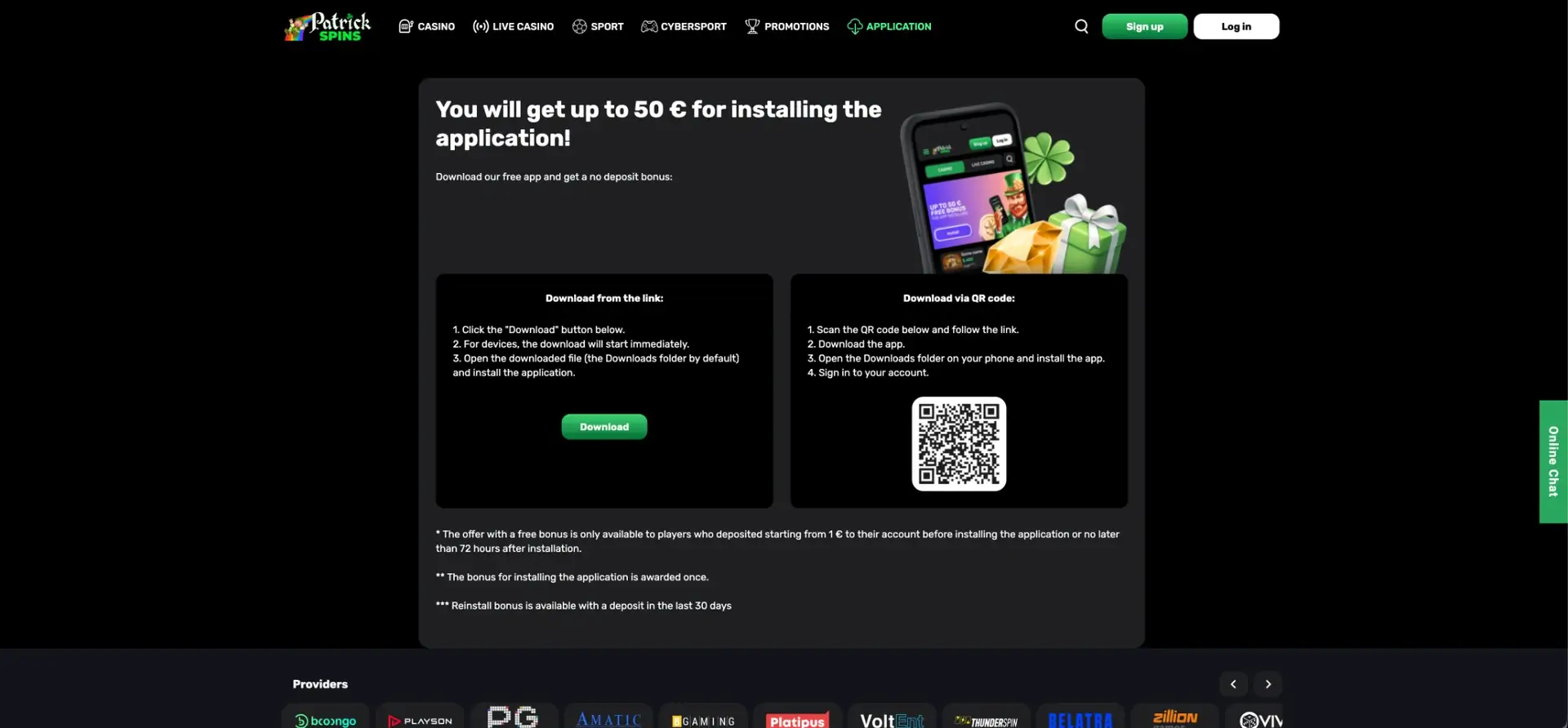
The Patrick Spins app is a free Android application downloaded from the Application section of the site, either with the Download button or by scanning a QR code, and installed from the phone's Downloads folder. It gives access to the full casino, live casino, sportsbook, Cybersport, promotions and Cashbox, and installing it pays a one-off bonus of up to about £43 (€50) to accounts with a deposit of at least about £1 made before installation or within 72 hours after it. iPhone users can run the same site in Safari and add it to the home screen as an icon.
The sections below describe both download methods, the Android permission needed to install the file, the exact conditions of the install bonus and the reinstall bonus, what works on mobile, and what to do if installation fails.
| Feature | Patrick Spins app details |
|---|---|
| Platform | Android, installed from a downloaded file |
| Download options | Download button on the Application page or QR code |
| Price | Free |
| Install bonus | Up to about £43 (€50), paid once per account |
| Install bonus condition | Deposit from about £1 (€1) before install or within 72 hours after |
| Reinstall bonus | Available with a deposit in the last 30 days |
| iPhone and iPad | Mobile site in Safari with a home screen shortcut |
| Products in the app | Casino, Live Casino, Sport, Cybersport, Promotions |
| Payments | Full Cashbox: cards, Apple Pay, Google Pay, Monzo, Revolut, Starling, crypto |
| Login | Email and password, Google, Telegram, X |
| Support | Online Chat inside the app |
Is there a Patrick Spins app for Android and iOS?
Yes for Android. The Application page offers an installation file that is downloaded directly from the casino site rather than from Google Play. Google's store has strict rules for real-money gambling apps, so many casinos distribute their Android apps this way.
For iPhone, the download page describes an installation through the Downloads folder, which is the Android method. iOS does not allow apps to be installed from a downloaded file. The practical solution on iPhone is the mobile version of the site in Safari, pinned to the home screen. It opens like an app, without the browser bar getting in the way, and contains the same games and features.
How to download the Patrick Spins app
The Application tab in the main menu opens a page with two download options side by side. Both lead to the same file.
Download from the link
This option is quickest when the Patrick Spins site is already open on the Android phone.
- Open the site in Chrome or another browser on the phone.
- Tap Application in the menu.
- Press the green Download button. The download starts immediately.
- Open the downloaded file from the Downloads folder.
- Allow installation from this source if Android asks for it.
- Tap Install, then open the app and sign in.
Download via QR code
This option is convenient when the site is open on a computer and the app is needed on the phone.
- Open the Application page on the computer.
- Scan the QR code with the phone camera and follow the link.
- Download the app.
- Open the Downloads folder on the phone and install the app.
- Sign in to the account.
Allowing installation on Android
Android blocks files from outside Google Play by default. The first time the file is opened, a message appears asking to allow installation from the browser or the file manager. The steps are similar on most phones:
- Tap Settings in the warning message.
- Switch on Allow from this source for the browser that downloaded the file.
- Return to the installer and tap Install.
Once the app is installed, the permission can be switched off again in Settings, Apps, Special app access, Install unknown apps. This keeps the phone protected without affecting the installed app. Google Play Protect may show a notice that the app is unknown; this is normal for files distributed outside the store. The file should only be downloaded from the official Application page, never from third-party sites.
Patrick Spins app bonus: up to £43 for installing
The Application page headline reads "You will get up to 50 € for installing the application", and calls it a no deposit bonus. In pounds, this is up to about £43. The small print under the download options sets three conditions, and they matter more than the headline:
- Deposit requirement: the bonus is available only to players who have deposited at least about £1 (€1) before installing the app, or no later than 72 hours after installation.
- One-time reward: the install bonus is paid once per account.
- Reinstall bonus: available only with a deposit made in the last 30 days.
The phrase "up to" also means the amount can be lower than the maximum. The practical order for getting the bonus is: register, make a small deposit, install the app within 72 hours, and sign in to the app with the same account. The bonus amount and any wagering are shown in the account once credited.
Install bonus compared with other Patrick Spins offers
The table puts the app bonus next to the deposit offers, to show how much value each one gives for the money put in.
| Offer | Minimum money in | What it gives |
|---|---|---|
| App install bonus | About £1 | Up to about £43, once |
| Welcome stage 1 | About £22 | 125% + 75 FS, x40 |
| Welcome stage 2 | About £43 | 150% + 100 FS, x40 |
| Welcome stage 3 | About £86 | 175% + 125 FS, x40 |
| Sport bonus | About £34 | 175%, x40, max bet about £1.70 |
For the smallest outlay, the app bonus gives the highest ratio of bonus to deposit of any offer on the site. It can be combined with the welcome package, since one is tied to installation and the other to the first three deposits.
Using Patrick Spins on iPhone and iPad
Safari runs the full mobile site, and a home screen shortcut makes it behave like an app.
Adding Patrick Spins to the home screen on iOS
The shortcut takes less than a minute to set up.
- Open the Patrick Spins site in Safari.
- Tap the Share icon at the bottom of the screen.
- Scroll down and choose Add to Home Screen.
- Keep the name "Patrick Spins" or type another, then tap Add.
- The icon appears on the home screen and opens the site directly.
Adding a shortcut on Android without the app
Players who prefer not to install the file can use a browser shortcut instead. The install bonus is tied to the app, so it is not paid for a shortcut.
- Open the site in Chrome.
- Tap the three-dot menu in the top-right corner.
- Choose Add to Home screen and confirm.
What is available in the app and mobile version
The mobile app and the mobile site show the same content as desktop, rearranged for a narrow screen.
- Casino: Popular, Trending, New and All rows, with Hold and Win titles such as Super Hot Chilli, Sun of Egypt 4, Diamond Strike XXL and Coins of Thunder.
- Live Casino: blackjack, roulette, baccarat, poker and game shows such as Wonder Wheel, Lucky Wheelionaire and Gravity Roulette.
- Sport: live and pre-match betting on football, tennis, basketball, cricket, ice hockey and more, with the betslip and booking codes.
- Cybersport: Dota 2, League of Legends, Valorant and Counter-Strike 2.
- Promotions: Missions, Leaderboard, Lotteries, the Mystery Jackpot and bonus activation.
- Cashbox: deposits and withdrawals with all supported methods.
- Support: Online Chat and the FAQ.
Many slots from PG Soft and Booongo are designed for portrait mode, so they fill the phone screen without turning it. Live dealer tables and sport streams usually work better in landscape.
Mobile payments in pounds
The mobile Cashbox is where the app makes the biggest difference for UK players, since mobile wallets and app-based banks confirm payments without typing card details.
| Method | How it works on mobile |
|---|---|
| Apple Pay | Confirmation with Face ID or Touch ID on iPhone |
| Google Pay | One-tap confirmation on Android |
| Monzo | Approval in the Monzo app |
| Revolut | Approval in the Revolut app |
| Starling Bank | Approval in the Starling app |
| Visa / Mastercard | Card details entered once, then saved for future deposits |
| Bank Transfer | Transfer through the banking app |
| Crypto | Wallet address or QR code to scan from a crypto wallet |
Limits for each method appear in the Cashbox once it is selected. Withdrawal rules are the same as on desktop: each deposit wagered at least three times, phone and email confirmed, documents uploaded.
Security on mobile
The app and mobile site use the same SSL encryption as the desktop version. The main mobile-specific risks are a lost phone and fake installation files. A screen lock on the phone, a unique account password, and downloading the app only from the official Application page cover both. Signing in with Google, Telegram or X shifts part of the protection to those services, so two-step verification should be switched on there.
Troubleshooting the Patrick Spins app
Installation problems usually have simple causes.
The file does not install
Check that installation from unknown sources is allowed for the browser used, that the phone has enough free storage, and that the download completed fully. Deleting the file and downloading it again solves interrupted downloads.
The QR code does not open
Most Android cameras read QR codes directly. If not, a QR scanner in Google Lens or the camera's settings will work. Good lighting and holding the phone steady help.
The install bonus was not credited
Check that there is a deposit of at least about £1 made before installation or within 72 hours after it, and that the bonus has not already been received on this account. If both conditions are met, the support chat can check the account.
Tips for UK players using the app
A few practical points help get the most from the app.
- Make the qualifying deposit first, then install, to stay well inside the 72-hour window.
- Activate a welcome stage on the Promotions page before the deposit if the bonus is wanted.
- Use Apple Pay, Google Pay or an app-based bank for quick deposits on the go.
- Upload verification documents with the phone camera straight from the app.
- Keep mission and leaderboard progress in view through the Promotions tab.
- Set personal deposit and time limits and stick to them, especially with an app that is always at hand.
Patrick Spins app FAQ
Answers to the questions most often asked about the mobile app.
Where can I download the Patrick Spins app?
From the Application section of the official site, using the Download button on an Android phone or the QR code on a computer.
Is the Patrick Spins app on Google Play or the App Store?
The app is distributed as a direct download from the casino site. iPhone users can use the mobile site in Safari with a home screen shortcut.
How much is the Patrick Spins app bonus?
Up to about £43 (€50), paid once per account. A deposit of at least about £1 is needed before installation or within 72 hours after it.
Can I get the app bonus again after reinstalling?
A reinstall bonus is available only to players with a deposit in the last 30 days.
Is the app safe to install?
The file from the official Application page uses the same SSL-protected connection as the site. Installation permission can be switched off again after setup.
Does the app have all the games?
Yes. Casino, live casino, sport, esports, promotions and the Cashbox are all available in the app.